Showing posts with label HyperMesh scripting. Show all posts

Tuesday, June 8, 2021

TCL Programming Basic Practice Exercises /Examples 2

ЁЯза TCL Programming Basic Practice Exercises / Examples (Part 2)

Hello friends! ЁЯСЛ
Welcome once again!

In this post, we’ll explore a few basic TCL programming exercises that will help you build logic, strengthen your scripting skills, and gain confidence in automation coding.


ЁЯФ╣ 1. Find the Number of Vowels in a String

set a "Rushikesh Patil" set b 0 set c [string length $a] for {set i 0} {$i < $c} {incr i} { set d [string index $a $i] if {$d == "a" || $d == "e" || $d == "i" || $d == "o" || $d == "u"} { incr b } } puts "The number of vowels are = $b"

ЁЯФ╣ 2. Random Number Output

for {set i 0} {$i < 100} {incr i} { set random_number [expr int(rand() * 10)] puts $random_number }

ЁЯФ╣ 3. Factorial Program (With and Without Recursion)

➤ Without Recursion

proc fact {n} { set f 1 while {$n >= 2} { set f [expr {$f * $n}] incr n -1 } return $f }

➤ With Recursion

proc recfact {n} { if {$n <= 1} { return 1 } expr {$n * [recfact [expr {$n - 1}]]} } puts "Factorial without recursion = [fact 4]" puts "Factorial with recursion = [recfact 4]"

ЁЯФ╣ 4. Fibonacci Series

set fib0 0 set fib1 0 set fib2 1 set s "" for {set i 0} {$i < 10} {incr i} { set fib3 [expr {$fib1 + $fib2}] set fib1 $fib2 set fib2 $fib3 append s "$fib1, " } puts "$fib0, $s" proc fib {n} { return [expr {$n < 2 ? $n : [fib [expr {$n - 1]]] + [fib [expr {$n - 2]]}}] }

ЁЯФ╣ 5. Count Letters in a String

set str "LIHAKHDBLICIHJAADFDCSDBBBDFDB" set l [string length $str] puts $l set cnt_A 0 set cnt_B 0 set cnt_C 0 set i 0 while {$i <= $l} { if {"A" == [string index $str $i]} { incr cnt_A } elseif {"B" == [string index $str $i]} { incr cnt_B } elseif {"C" == [string index $str $i]} { incr cnt_C } incr i } puts "The count of A is $cnt_A" puts "The count of B is $cnt_B" puts "The count of C is $cnt_C"

ЁЯМЯ Summary

These simple TCL programs help you understand the fundamentals of loops, conditions, recursion, and string operations.
Practicing such examples builds your confidence and prepares you for automation scripting in CAE and engineering workflows.

Thank you for reading! ЁЯЩП
Keep practicing and stay tuned for more exciting TCL examples in upcoming posts.

Saturday, June 5, 2021

TCL Programming Basic Practice Exercises /Examples 1

ЁЯза TCL Programming Basic Practice Exercises / Examples (Part 1)

Hello friends! ЁЯСЛ
Welcome once again!

In this post, we’ll go through some basic yet powerful TCL programming exercises to help you strengthen your logic, scripting skills, and confidence in automation.


ЁЯФ╣ 1. Swapping Variables

Using a Temporary Variable

set a 100 set b 50 set c $a set a $b set b $c puts $a ;# Output: 50 puts $b ;# Output: 100

Without Using a Temporary Variable

set a 100 set b 50 set a [expr $a + $b] set b [expr $a - $b] set a [expr $a - $b] puts $a ;# Output: 50 puts $b ;# Output: 100

ЁЯФ╣ 2. List to String Conversion

set a "" set b "1 2 3 4 5 6" for {set i 0} {$i+1 < [llength $b]} {incr i} { append a [lindex $b $i] } puts "$a" puts [llength $a]

String to List Conversion

set a "abcdef" set b [split $a ""] puts $b puts [llength $a] puts [llength $b]

ЁЯУЭ Note:
There’s no difference between a string and a single-element list in data structure terms.


ЁЯФ╣ 3. Multiply Two Numbers Without Using the Multiplication Operator

set a 5 set b 4 set c 0 for {set i 0} {$i <= $b} {incr i} { set c [expr $a + $c] puts $c ;# Verification } puts "Final: $c"

ЁЯФ╣ 4. Namespace Example

Object-oriented style code using namespaces ЁЯСЗ

namespace eval sample { proc sum {m n} { set add [expr $m + $n] return $add } } puts [sample::sum 4 4]

Each namespace allows variables with the same name without conflict — making large programs easier to manage.


ЁЯФ╣ 5. String Manipulation Examples

set str1 "cisco" set str2 "systems" puts [string compare $str1 $str2] ;# -1 puts [string equal $str1 $str2] ;# 0 puts [string first is $str1] ;# 1 puts [string first co $str1] ;# 3 puts [string first c $str1] ;# 0 puts [string index $str1 2] ;# s puts [string length $str1] ;# 5 puts [string range $str1 2 4] ;# sco puts [string range $str1 2 end] ;# sco puts [string toupper $str1] ;# CISCO puts [string tolower [string toupper $str1]] ;# cisco puts [string trim $str1 o] ;# cisc

ЁЯМЯ Summary

These examples build your foundation in TCL scripting, covering variables, loops, lists, namespaces, and string operations.
Practice regularly to enhance your CAE automation and logic development skills.

Thank you for reading! ЁЯЩП
Keep exploring and stay tuned for Part 2 for more advanced TCL examples!

Friday, November 27, 2020

HyperMesh Scripting Tcl/Tk Helpful For Beginners | Hypermesh scripting | 3

HyperMesh Scripting Tcl/Tk Helpful For Beginners | Hypermesh scripting | 3


Once again, I come up with new short examples of hypemesh scripting. so let's see the below examples.

Hypermesh Micro - 1

If you want to add the thickness after the component name, normally it is too lengthy if you go with it manually. At the same time if you used this script you can do it for too many parts in just a single click. 

Hypermesh Script

Hypermesh Micro - 2 


If you want to print the name of the part & its properties then you can follow this script. You will easily get all details regarding parts. 


hypermesh script


Conclusion - 


These are the basic scripts. In the upcoming post, I would like to aware you of the graphic user interface & button creation in hypermesh. Also, In the future post, I will share how you can remember the syntax of hypermesh scripting & usage of command file which is very interesting & useful. 

# Hypermesh Scripting
# Hypermesh Automationm 


Tuesday, November 17, 2020

Tcl basics for Hypermesh scripting | Hypermesh Automation | Computer-aided engineering

Tcl basics for Hypermesh scripting

Hello friends, In this post, I have shared Tcl basics for hypermesh scripting. This post is beneficial to all those who are just starting hypermesh scripting and for those who want to learn hypermesh scripting. I thought you should go through this post which helps you a lot while scripting. 

This post especially for those who are a beginner in hypermesh scripting & want to explore his knowledge in automation.

After completion, you will find the answers to these questions.
  1. How to use for loop in Tcl language?
  2. How to use while loop in Tcl language?
  3. How to use the if-else statement in the Tcl language?
  4. How to use the if if-else else statement in the Tcl language?
  5. How to use the list in the Tcl language?
  6. How to use the function in the Tcl language?
  7. How to comment in the Tcl language?
  8. How to add variables in Tcl language?

Video No.1 Tcl basics for hypermesh scripting:

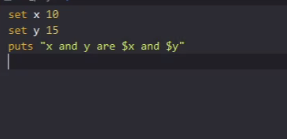
If you want to add string and variable then go through the following code.

basics for hypermesh scripting


Video No.2 Tcl basics for hypermesh scripting:

If you want to add to string together then you can go through the following code. you will find an answer to how to add two string in Tcl language.

string add in tcl language


Video No.3 Tcl basics for hypermesh scripting;

If you want to add two variables & want the addition of it then you should go to this code.

Tcl basics for hypermesh scripting


Video No.4 Tcl basics for hypermesh scripting:

If you want to learn how to use a list in Tcl language with a short example you can go through this video. I am trying to maintain short & quick examples for understanding. 

list in tcl programming language


Video No.5 Tcl basics for hypermesh scripting:

If you want to learn how to use for loop then you can go through the following photo and video. 


for loop in Tcl language


Video No.6 Tcl basics for hypermesh scripting:


If you want to learn how to use function then you should go through the following code & details.

function in Tcl programming language


Video No.7 Tcl basics for hypermesh scripting:

If you want to learn how to use while loop in Tcl language with a short example you can go through this video. I am trying to maintain short & quick examples for understanding. 

while loop in Tcl programming language


Video No.8 Tcl basics for hypermesh scripting:

If you want to learn how to use if-else in the Tcl language you can refer to the following photo & video for quick understanding. 

how to comment tcl programming language


Video No.9 Tcl basics for hypermesh scripting:


If you want to learn more advance in if-else then you can refer to the following photos and videos. 

How to use if-else statement in Tcl programming language.


Video No.10 Tcl basics for hypermesh scripting:

If you want to learn how to comment & some more basics regarding the Tcl programming language then you can go through the following details. 


Conclusion:

In this way, we have learned the basics of Tcl language for hypermesh scripting. It is based on hypermesh scripting to understand complex code. before going to core scripting in hypermesh I thought you should go through this post which helps you a lot while scripting. 

# HyperMesh scripting
# HyperMesh Automation
# Computer-aided engineering
# Finite element analysis


Thursday, November 12, 2020

HyperMesh Scripting Tcl/Tk Helpful For Beginners | Hypermesh Scripting 1

HyperMesh Scripting Tcl/Tk


HyperMesh Scripting | I want to highlight HyperMesh scripting with sharp examples. Before going to the depth, Initially, I will target basic questions which are usually generated in a beginner's mind. I hope, you will have a background in any programming language.


Hypermesh Tcl scripting 

What is a HyperMesh Macro? 

It is a scripted or command file used to automate a series of steps in HyperMesh.


But Why do we need it? 

To save time in repeated work.


What is Tcl/Tk? 

Tcl (Tool Command Language) is a scripting as well as a programming language.


It is invented by John Osterhout in 1989. It is easy to read, write & understand.


Tk (Tool kit) is a widget tool that is useful while creating of GUI (Graphics User Interface), in simple language, GUI means mobile application but here it is a computer application.


If you want to learn Tcl/Tk language, I will suggest the platform - Tutorialspoint


Below, I have given some initial hints which are helpful while scripting the scripting panel. 


This is an interpreted language. In HyperMesh scripting panel commands execute in line-by-line order same as the python programming scenario. If you notice well, After a run a single command it shows 1 or 0 entity it means,


1 show - command is executed.


0 shows - the command is not executed.


Unfortunately, there is no command to stop the script while running. I told you this basic because you might be facing issues like being trapped in an infinite loop. 


HyperMesh doesn't allow us to work with their entities like elements, nodes, sets, etc. there is a solution for this, and that is the concept available in HyperMesh scripting Mark.


Marks specify groups of entities that are transferred to the command processor. Marks can be created for entities like nodes & elements. Marks can create up to 2 times and it has their id. every time initially you have to need to call mark while scripting.


If you want to delete generated marks, you can use *clearmarkall or hm_markclear Elem 1 these commands as well as to maintain simplicity in the default scripting panel in hypermesh you can use clear command. 


If you observe well, you will find that hypermesh scripting code is not the same as Tcl scripting language so questions arise! What is that change?


Syntax of hypermesh scripting does not contain any parentheses and commas; they have been replaced with a blank space. Notice that while the parentheses and commas have been removed, each of the commands still begins with an asterisk (*) and that the command name hasn’t changed.


For example:

*setmeshlinecolor(6) = * setmeshlinecolor 6

*jpegfile() = *jpegfile


This scripting language is an interpreted language. It’s executed line by line you can compare it with python scripting. 


Hypemesh scripting panel


Basic Hyperscript Script No 1


Here, if you want to know all Component IDs in the deck you can try this script. At the initial stage, this type of script will help you to build a large logic & script. (Code is in green color. let’s execute it in the scripting panel.)


*createmark comp 1 all

set all_comp_id [hm_getmark comp 1]

puts $all_comp_id


Basic Hyperscript Script No 2

Here if want to know the number of nodes or elements on your screen you can execute this program, it will help you a lot with the understanding of how the program is executed in Hypermesh script.


*createmark elem 1 "displayed"

hm_marklength elem 1


or


*createmark node 1 "displayed"

hm_marklength node 1


Basic Hyperscript Script No 3

If you want to print the name as well as the component id you can try this program. Also in this program, you will get aware of how to use loops in hypermesh scripting.


*createmark comp 1 all

set comp_id [hm_getmark comp 1]

puts "id of all deck: $comp_id


foreach terms $comp_id  {

set name [hm_getvalue comp id =$terms dataname=name]

puts $name

}


Please check my other post I hope you will find it more interesting there. 

Thank you for your attention.


Conclusion:


I hope, you will get a basic idea of HyperMesh scripting & Tcl/Tk. In upcoming videos, I will come with more advanced scripts & I will teach how to generate buttons in the utility menu & attach a Tcl script to it with tool kit knowledge. Sorry for the English I am working on it. Thank you so much for your time.

#hypermesh scripting 

#hypermesh scripting for beginners.


Tuesday, November 10, 2020

HyperMesh Scripting Tcl/Tk Helpful For Beginners | hypermesh scripting 2

HyperMesh Scripting Tcl/Tk Helpful For Beginners | Hypermesh scripting | 

In the last hypermesh scripting post I had introduced to you 3 basic scripts of hypermesh, here in this post, I have come with 4 new hypermesh scripts that will be helpful while doing work on hypermesh. So without wastage of time, let's see. 

Hypermesh scripting
Source: Unsplash


Basic Hypermesh Script No. 4

If you want to detach all elements in the deck at the same time you can use the below script. It will detach all elements which are shown on the desktop. 

Scripts are available in pink color.

set a 1

while {$a<100} {

    *createmark elements 1 $a

    *detachelements 1 0

    incr a

}


Basic Hypermesh Script No. 5 

If you want to print all part id or node id or elements id you can go through the following Tcl code. Don’t forget to use clear command while using the new script, otherwise, it might be showing you the error.


For component id:

*clearmark comp 1; *clearmark comp 2 

hm_createmark comp 1 "advanced" "displayed"

set comp_id_list [hm_getmark comp 1]

puts "$comp_id_list"


 For elements id: 

 *clearmark elem 1; *clearmark elem 2 

hm_createmark elem 1 "advanced" "displayed"

set comp_id_list [hm_getmark elem 1]

puts "$comp_id_list"


For nodes id:

*clearmark node 1; *clearmark node 2 

hm_createmark node 1 "advanced" "displayed"

set comp_id_list [hm_getmark node 1]

puts "$comp_id_list"


Basic Hypermesh Script No. 6

If you want to remove particular elements submitted into the mark then you can use the following code to delete the elements as you want.

*createmark elem 1 38931 38951 38972

hm_marklength elem 1

hm_markremove elem 1 38931

hm_marklength elem 1


Basic Hypermesh Script No. 7

If you want to delete all the face which are under 5 mm area then you can use the following code which is very useful while going through geometry clean up in plastic meshing or 2D meshing. 


proc delete_face_under {} {

*clearmarkall 1; *clearmarkall 2

*createmark face 1 all

set face_entity [hm_getmark face 1]


foreach entity $face_entity {

    puts $entity

}

}

delete_face_under;


Conclusion:

Once upon we learn 4 basic scripts which is the base for complex scripting. I will attach some basics of Tcl/Tk programming language which directly helps to understand and resolve the complexity level of understanding. In an upcoming post I will aware you about if you don't know the syntax of Tcl scripting then how can you code in hypermesh scripting panel of usage of the command. Tcl & much more with simple language.


Thank you !

Search This Blog

Contact Form

Name

Email *

Message *